

A1.2 Segmentation Survey
Identify distinct consumer groups within your target audience, understand what drives each segment, and convert them into AI Twins for deeper Quantitative and Qualitative Research.
Introduction
A Segmentation Survey is a Standard Survey workflow in consumr.ai that helps you identify the different types of consumers that exist within a defined audience. It is used when a brand does not want to treat its market as one large, average group, because averages often hide the differences that matter most. Two consumers may fall in the same age group, income bracket, or geography, but they may buy for completely different reasons, trust different sources, respond to different messages, and face different barriers. A Segmentation Survey helps separate those groups in a structured way.
Segmentation is one of the most valuable exercises in Market Research, but it is also one of the hardest to design and execute well. The quality of the output depends on the audience definition, the survey structure, the questions asked, the response patterns, and the logic used to group consumers into meaningful clusters. In traditional research, this usually requires research expertise, fieldwork, statistical analysis, and time. consumr.ai takes care of this complexity by providing a templatized Segmentation Survey workflow. Users define the audience through portfolio data or an audience panel brief, and consumr.ai runs the segmentation process through its AI Twins and Respondents.
Brands need a Segmentation Survey when they want to understand who their consumers really are beyond simple demographic cuts. It can help identify high-value groups, emerging opportunities, price-sensitive audiences, loyalists, unengaged prospects, or consumers with very different purchase motivations. This is useful before building a brand strategy, launching a product, planning media, refining messaging, prioritizing channels, or deciding which audiences deserve deeper research.
One of the most useful parts of running a Segmentation Survey on consumr.ai is that any segment identified in the output can be converted into an AI Twin. This means the segment does not remain a static research finding. It becomes a usable consumer representation that can be taken into further Quantitative Research and Qualitative Research workflows. Teams can run follow-up Quant Surveys against a segment, conduct Focus Groups, test creative, explore product ideas, or have AI Twin Conversations to understand the motivations behind the numbers.
A Segmentation Survey should be done when a brand is entering a new category, expanding into a new audience, repositioning itself, launching a major product, or noticing that one message is not working equally well across the market. It should also be repeated when consumer behavior changes meaningfully because of market shifts, competitive activity, pricing changes, new distribution channels, or changes in media consumption. For most brands, segmentation does not need to be run every week. It is usually a foundational study that can be refreshed periodically, or whenever the brand has reason to believe that the market has changed enough for old segment definitions to become less useful.
How to Create a Segmentation Survey
Video Walkthrough: How to create the survey?
A Segmentation Survey is a Standard Survey workflow in consumr.ai that helps you identify the distinct consumer groups that exist within a defined audience. It is useful when a brand does not want to treat its market as one large average, because consumers who look similar demographically may still buy for very different reasons, trust different sources, respond to different messages, and face different barriers.
Segmentation is one of the most valuable forms of Market Research, but it is also difficult to design and execute well. The quality of the output depends on how the audience is defined, how the questions are structured, how the responses are interpreted, and how consumers are grouped into meaningful clusters. consumr.ai takes care of this complexity through a templatized Segmentation Survey workflow. Users define the audience using portfolio data or an audience brief, and consumr.ai runs the segmentation using AI Twins and Respondents.
A Segmentation Survey helps brands understand who their consumers really are beyond age, gender, income, or location. It can identify loyalists, high-growth groups, price-sensitive consumers, emerging opportunities, unengaged prospects, and audiences with different purchase motivations. These segments can then inform brand strategy, product planning, media strategy, messaging, creative development, and further Quantitative Research or Qualitative Research.
You should run a Segmentation Survey when entering a new category, expanding into a new audience, repositioning a brand, launching a major product, or noticing that the same message is not working equally well across the market. It can also be scheduled to run monthly or quarterly, so teams can stay updated on how audience preferences, purchase motivations, and barriers are changing over time. Segmentation does not need to be refreshed every week, but it should be revisited whenever the market changes enough for old segment definitions to become less useful.
There are also situations where a Segmentation Survey may not be the right first step. If the audience is too narrow, the cohort may not be strong enough to produce useful segmentation. If the user only needs a simple demographic cut, a full segmentation study may be more than required. If the objective is to understand why consumers behave a certain way, the better next step may be a Qualitative Research workflow such as Focus Groups, Investigative Interviews, or AI Twin Conversations. Quantitative segmentation tells you which groups exist and how they differ. Qualitative Research helps explain what is happening inside those differences.
Video Walkthrough: Final Report
Step 0: Go to Segmentation
Log in to consumr.ai and navigate to the main dashboard. From the dashboard, go to Calendar, select New Event, and then choose New Research Study. From the study creation flow, select Quant, then Survey Research, then Standard Survey, and finally Segmentation.
Step 1: Select Your Survey Type
On the Survey Type screen, select Segmentation and click Choose Approach.
Step 2: Choose Your Approach
consumr.ai provides two setup paths for a Segmentation Survey.
The first option is Build Using Portfolio. Use this when your portfolio is already set up in consumr.ai and you want the segmentation to be anchored in the brand, category, product, or audience context already available in the platform. This approach uses the existing portfolio foundation to identify the optimal segment structure within the selected category or audience.
The second option is Provide an Audience Panel Brief. Despite the label, this does not mean consumr.ai is using a traditional third-party human research panel. This path lets you describe the audience you want to study in your own words, including demographics, behaviours, interests, pain points, and category context. consumr.ai then uses that brief to identify the target population and run the segmentation workflow.
Part A: Build Using Portfolio
Step 3A: Configure Your Segment
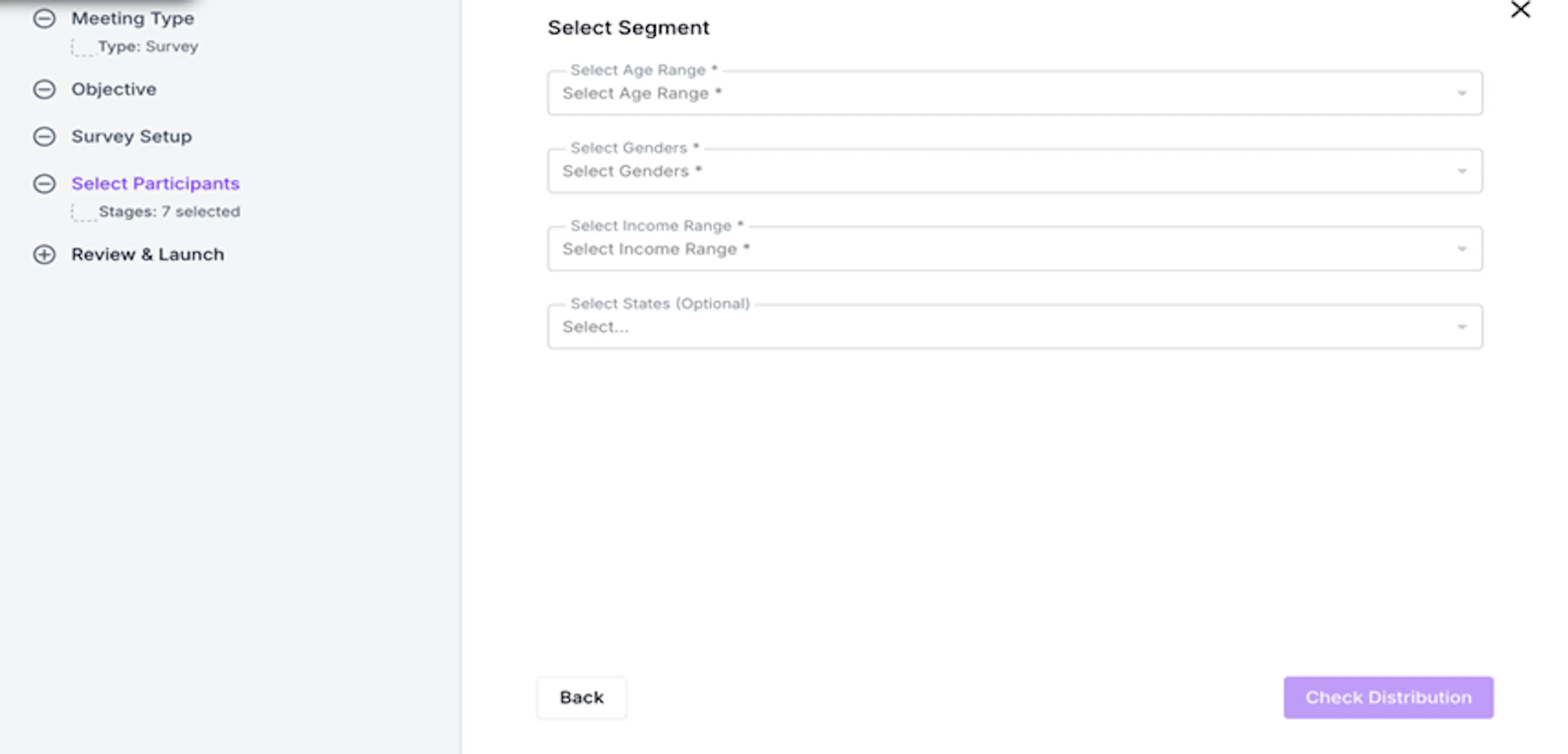
After selecting Build Using Portfolio, you will be taken to the Select Segment screen. Here, you need to set the distribution filter. Age Range, Gender, and Income Range are required fields. States is optional. If you do not select specific states, consumr.ai will treat the selection as all states within the selected country.
This distribution filter defines the population the segmentation will run against. A very broad setup may average out meaningful differences between consumers. A very narrow setup may reduce the strength of the cohort. Review the setup carefully before proceeding and use the platform’s distribution and statistical indicators to confirm whether the audience is strong enough for the study.
Once the distribution filter is ready, click Check Distribution.
Step 4A: Review the Distribution
The Distribution screen shows the population and income breakdown of the selected cohort before the survey is launched. Use this screen as a sense-check. Confirm that the cohort reflects the audience you intended to study before committing to the run.
Part B: Provide an Audience Panel Brief
Step 3B: Write Your Audience Brief
After selecting Provide an Audience Panel Brief, a text field appears under Target Audience Description. Use this field to describe the consumer population you want the segmentation to study. Include relevant demographic details, interests, behaviours, needs, purchase context, and pain points.
Be specific. A vague brief will return a broad population, and the segments will reflect that. A more precise brief helps consumr.ai identify a more useful target population. For example, instead of writing “people who buy running shoes,” describe the audience by age range, activity level, income range, buying behaviour, what they care about, and what may frustrate them in the category.
Once your brief is written, click Select Segment to proceed.
Step 4B: Review the Distribution
After submitting the brief, consumr.ai generates a distribution preview showing the population and income breakdown of the cohort it has identified. Review this before launching. If the cohort does not reflect the audience you intended, go back and refine the brief.
Once you are satisfied with the distribution, click Run Segmentation.
How to Read the Segmentation Results
Once the Segmentation Survey has run, consumr.ai surfaces the distinct consumer groups identified within the defined population. Each segment is dynamically named and labelled based on what the survey data shows. The names and labels are not fixed templates. They are generated to describe the role, behaviour, or opportunity represented by that segment in the context of the study.
Labels such as Loyalists, High Growth, Emerging, At Risk, or Price Sensitive should be read as strategic descriptors. They help users quickly understand the segment’s business meaning, but the underlying segment profile should still be reviewed before making decisions.
The filters at the top of the results screen allow you to explore how segment composition changes across Age Range, Gender, Income Range, and Stage. In this context, Stage refers to Stage of Conversion. Use these filters to understand how the same segmentation structure behaves across different audience cuts.
Exploring a Segment
Click any segment card to open its full profile. The segment profile brings together several outputs that explain who the segment is, what drives them, what influences them, and what may prevent them from buying.
The Segment Story provides a plain-language interpretation of the segment. It explains who this consumer is, what a successful purchase looks like for them, and which barriers or frictions may prevent purchase. This should be read as an interpretation of survey data, not as a claim of absolute causality.
The Segment Fingerprint is a radar chart built from composite indices derived across multiple survey questions. The dimensions are generated dynamically based on the category being studied, so they may differ from one study to another. Hover over the information icon next to each axis to see which survey questions contribute to that dimension. The shape of the fingerprint helps compare segments that may look similar demographically but behave very differently.
The Influence Mix shows where a segment places trust when making purchase decisions. This is shown as a 100-point allocation across different influence sources. Because the points are distributed, the output should be read as relative trust across sources, not as an absolute rating of each source. Use this to understand which channels, proof points, or voices may matter more for each segment.
Mission Drivers show what triggers the shopping or decision journey for the segment. Emotional Job shows what the segment wants to feel as an outcome of the purchase. Friction shows what may get in the way. Read together, these panels describe the purchase journey: what starts it, what the consumer wants to achieve, and where the journey may break down.
Once you have reviewed a segment, you can click Create Twin to convert that segment into an AI Twin for use across the platform.
→ How to create an AI Twin from a Segment
Distribution Tab
The Distribution tab shows the raw question-by-question responses extrapolated to actual population numbers. Use this tab when you want to go back to a specific question directly rather than relying only on the interpreted segment profile. The full dataset can be downloaded from the top right of the screen.
Scheduling a Segmentation Survey
A Segmentation Survey can be run once or scheduled to repeat. If your market is changing quickly, or if the brand wants to stay updated on how audience preferences are moving, you can schedule the survey to run every month or every quarter.
Running segmentation on a recurring cadence helps teams see whether segment sizes are changing, whether motivations are shifting, and whether barriers are becoming stronger or weaker. This is especially useful when a brand is running major campaigns, launching new products, entering new markets, changing pricing, or responding to competitive pressure.
For tracking purposes, keep the audience definition consistent across runs. If the distribution filter, audience brief, or market definition changes too much, comparisons across waves may become less reliable. The first setup should therefore be created carefully, because it becomes the baseline for future comparisons.
How to Use Segmentation After the Survey
Segmentation should not end with the segment cards. The output should guide what the team does next. High-value segments may be prioritized for media and messaging. Price-sensitive segments may need different offers or proof points. Emerging segments may deserve further investigation. Segments with strong friction may need product, pricing, or experience changes before marketing can work harder.
The most useful next step is often to convert a segment into an AI Twin. Once a segment becomes an AI Twin, it can be used for deeper research across consumr.ai. Teams can use it in Focus Groups, Creative & Content research, Investigative Interviews, AI Twin Conversations, Concept Testing, Product Testing, and other Quantitative or Qualitative Research workflows.
This is what makes Segmentation on consumr.ai useful beyond the first report. The study identifies the groups. The AI Twin lets you continue learning from them.