
Working with Omnibox
Start with a keyword, category, audience or URL, then build the consumer intelligence and geographic understanding needed to find the right people and the markets where they matter most.
What Is Omnibox?
Omnibox is the intelligence entry point on consumr.ai. It allows teams to begin with the information they already have, whether that is a research brief, an existing audience, an interest, a keyword, a category, or a URL, and develop it into structured consumer intelligence.
This matters because research rarely begins with every input already defined. A marketer may know the business question but not the exact audience signals needed to investigate it. Another team may have a customer audience but need to understand the behaviors, interests, searches, and conversations surrounding it. A strategy team may begin with a category or product and need to discover both who is relevant and where the opportunity is concentrated.
Omnibox accommodates these different starting points within one research workflow. It helps users move from what they know at the beginning to the intelligence required for a more complete understanding of the consumer.
One Consumer, Three Forms of Intelligence
Consumers cannot be understood through one type of signal alone.
What people do can differ from what they say. What they search for may reveal needs or questions that do not appear in their public conversations. What they discuss may explain the language, concerns, comparisons, and experiences surrounding a product or category, but conversation alone does not provide a complete picture of their wider lifestyle and behavior.
Omnibox brings together three complementary forms of intelligence:
- Behavior Intelligence helps decode what consumers actually do. It examines behavioral, demographic, psychographic, lifestyle, engagement, and purchasing signals associated with the audience.
- Intent Intelligence helps identify what consumers may want next. It examines search behavior and keywords to surface the questions, needs, products, and subjects the audience is actively exploring.
- Mentions Intelligence helps capture authentic consumer voices. It examines relevant conversations across social media, forums, reviews, and specialized public domains to understand the language, context, sentiment, and perceptions surrounding the subject.
Each form of intelligence provides a different lens. Behavior establishes the broader consumer context. Intent reveals active curiosity, need, or consideration. Mentions preserves the vocabulary and experiences expressed in public conversation.
The individual reports are explained in their respective support articles. Within Omnibox, the important principle is that these three forms of intelligence can be created from a connected research starting point rather than assembled through unrelated searches.
From a Brief to Research Inputs
A brief is not automatically a research configuration.
For example, a team may want to understand young professionals interested in sustainable skincare. That brief contains several possible research components: an audience, a life stage, a category, a set of behaviors and values, relevant search themes, product concerns, and conversations about sustainability or skincare.
Omnibox interprets the brief and separates these components into the inputs that can support the relevant reports. The user can then review what has been identified, decide which elements belong in the study, remove irrelevant interpretations, and refine each report before it is created.
This translation is an important part of the workflow. Omnibox does not require the user to understand the structure of every underlying data source before beginning. At the same time, it does not remove the user’s judgment from the research process. The researcher remains responsible for confirming that the interpreted audience, keywords, categories, locations, and exclusions accurately represent the original question.
Different Starting Points for Different Levels of Audience Knowledge
Omnibox supports different starting points because organizations do not always begin research with the same information or data access.
A team with a business question but no structured research inputs can begin with a natural-language brief. Omnibox interprets the brief and organizes its components into inputs for the relevant intelligence reports.
An organization with its own audience data can begin with a first-party audience. This keeps the research anchored to a consumer group derived from the organization’s existing customer or audience relationships.
When an appropriate first-party audience is not available, the user can select a third-party audience. These are curated datasets composed of defined consumer segments collected and aggregated by external data intelligence companies (meta, snapchat, pinterest). They provide access to established audiences based on characteristics such as interests, behaviors, or life stages.
The user may also begin with a keyword, category, or URL when the research is centered on a subject, market, product, brand, or digital destination rather than a predefined audience.
- A Keyword is a plain search phrase, something like "zero sugar energy drinks" or "coffee shops near me."
- A Category is a predefined market category, like Beverages or Energy Drinks, useful when you want the broader space rather than one specific phrase.
- A URL points at a specific webpage or product listing you want the report built around.
- A Brief is a written description of what you're trying to understand, left as free text for the platform to interpret rather than a single term or link.
- The All tab accepts any of these without asking you to commit to a type first, useful when you're not sure which format fits.
These inputs represent different ways of entering the same intelligence workflow. The correct starting point depends on whether the organization begins with a research question, an audience it owns, an audience available through a third-party provider, or a market subject it wants to investigate.
Omnibox vs Research Setup
Omnibox and Research Setup can both contribute intelligence to an AI Twin, but they serve different purposes.
Research Setup is used when the intended outcome is already clear: the user wants to define an audience and create a Segment or AI Twin. The workflow begins with audience information, such as an existing definition, an uploaded audience brief, or a first-party audience, and develops it into the structured foundation required for research.
Omnibox is used when the starting point is the research question itself. The user may begin with a brief, keyword, category, URL, first-party audience, or third-party audience and use it to generate Behavior, Intent, and Mentions intelligence. The immediate objective may be to understand a market, investigate an audience, explore demand, monitor conversation, or identify an opportunity. Creating an AI Twin is one possible next step, but it is not required.
This makes Omnibox an exploratory intelligence environment as well as a route into AI Twin creation. The reports can be examined as standalone research outputs, used to refine the team’s understanding of an audience, or carried forward into the AI Twin framework.
When they are used for an AI Twin, Behavior Intelligence contributes to the Twin’s Persona, while Intent and Mentions Intelligence contribute to its Memories. Omnibox does not replace Research Setup. It allows teams to discover and develop the intelligence before deciding how that intelligence should be used.
From Understanding an Audience to Finding It
Understanding who an audience is does not automatically show where that audience is most relevant.
A consumer interest may appear across many countries, but its relative strength may differ substantially between markets. The same variation can exist within a country, where particular states, cities, or ZIP codes show a stronger concentration than the national average.
Market Finder and Sniper extend Omnibox from audience understanding into geographic discovery.
Market Finder provides the wider market view. It helps identify the countries or broader markets in which the selected audience or interest shows stronger affinity.
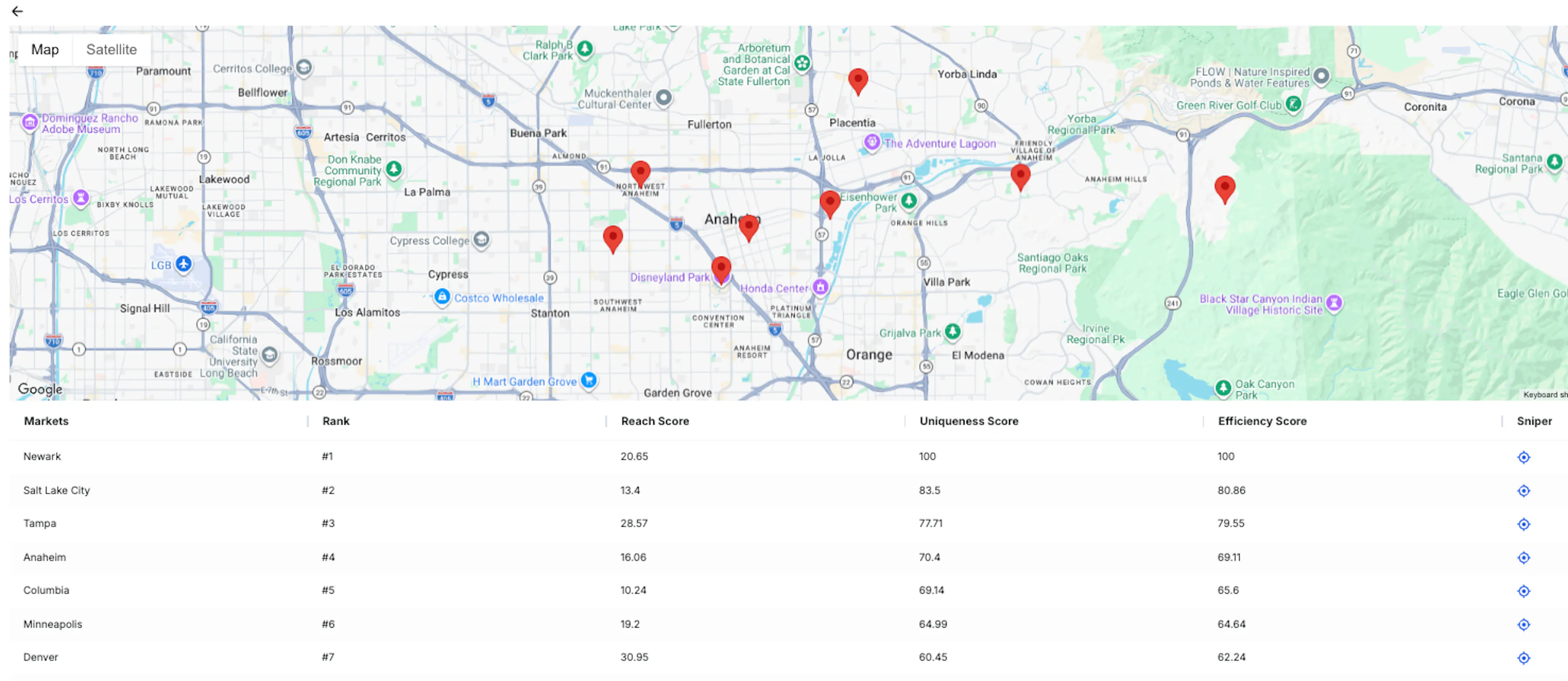
Sniper narrows that analysis within a selected market. It helps locate more specific geographic concentrations at levels such as states, cities, and ZIP codes where data is available.
The two capabilities support a progressive line of inquiry:
- Who is the relevant audience?
- What behaviors or interests define the affinity being studied?
- Which broader markets show the strongest affinity?
- Where within a selected market is that affinity concentrated?
This progression connects audience intelligence with geographic opportunity. A team can begin with a consumer question, understand the audience around it, compare relevant markets, and then narrow the analysis to more specific locations.
Why Market Finder and Sniper Belong in Omnibox
Market discovery is often approached only after a campaign is being planned. By that stage, the team may already have selected a country, region, or audience based on existing assumptions.
Market Finder and Sniper allow geography to become part of the research process earlier. Teams can investigate where an audience or interest is comparatively stronger before deciding which markets deserve deeper analysis, investment, or activation planning.
This makes the geographic result more meaningful because it remains connected to the audience intelligence that produced it. The user is not simply browsing locations. The analysis is anchored to a defined audience or interest and progressively examines where that affinity becomes stronger.
What Omnibox Will Not Tell You
Omnibox structures and connects intelligence, but it does not remove the need for research judgment.
A parsed brief is an interpretation of the user’s question. Broad language, ambiguous terms, overlapping audiences, and words with multiple meanings can produce inputs that require correction or exclusion before the reports are created.
Behavior, Intent, and Mentions also represent different forms of evidence. A search does not always indicate a purchase decision. A public mention does not represent the entire market. An observed affinity does not explain every motivation behind it. The reports should be interpreted together where the research question requires a more complete consumer view.
Market Finder and Sniper identify relative geographic affinity. They do not independently measure total market size, revenue potential, competitive difficulty, distribution feasibility, or guaranteed demand. A smaller market may show strong affinity while containing fewer consumers overall. A large market may contain a significant audience even when its relative affinity is lower. The geographic findings should therefore identify where further investigation may be valuable. Final market decisions should also consider population size, commercial potential, competition, cost, regulation, distribution, and the organization’s strategic priorities.
Walkthrough of How to Use Omnibox
Step 1: Open Omnibox
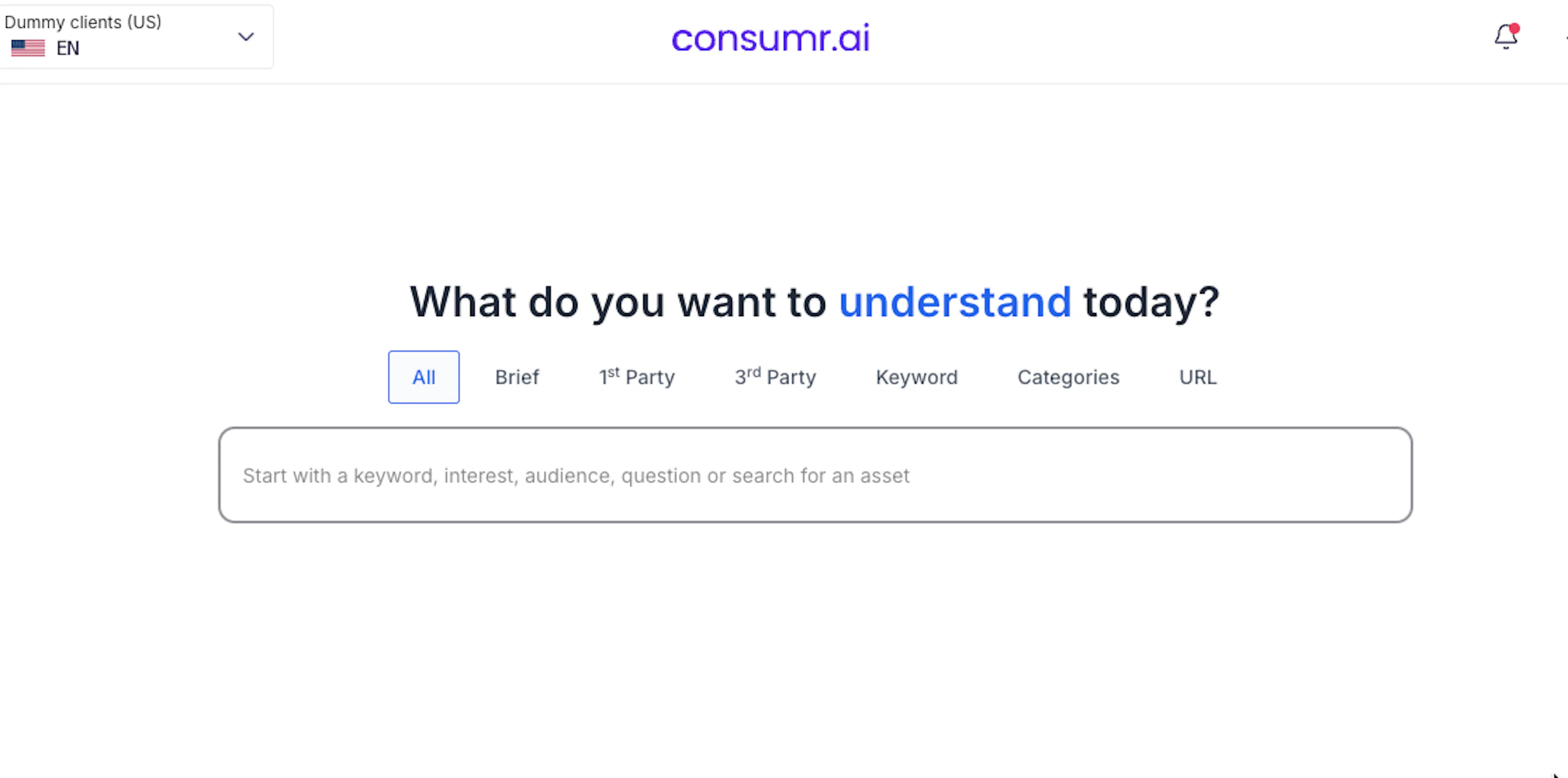
From the consumr.ai dashboard, open Online to access Omnibox.
The All tab displays every available input method in one view. You can also open an individual tab when you already know how you want to begin:
- Brief
- First-Party Audience
- Third-Party Audience
- Keyword
- Category
- URL
Creating Intelligence From a Brief
Step 2: Enter the Research Brief
Open the Brief tab and describe the research question in natural language.
The brief can include the audience, behaviors, interests, category, brands, search activity, locations, or conversation topics relevant to the question.
A brief is useful when the research contains several connected components or when you do not yet know how those components should be divided across Behavior, Intent, and Mentions.
Step 3: Select the Report Types
Open the report-type menu and choose which reports should be created:
- Behavior
- Intent
- Mentions
Each method has a default report type. Select the report that is relevant to your research question.
Step 4: Submit the Brief
Select the submit button to process the brief. Omnibox interprets the question and separates the relevant audience, behavior, search, category, brand, location, and conversation inputs.
Step 5: Review the Parsed Inputs
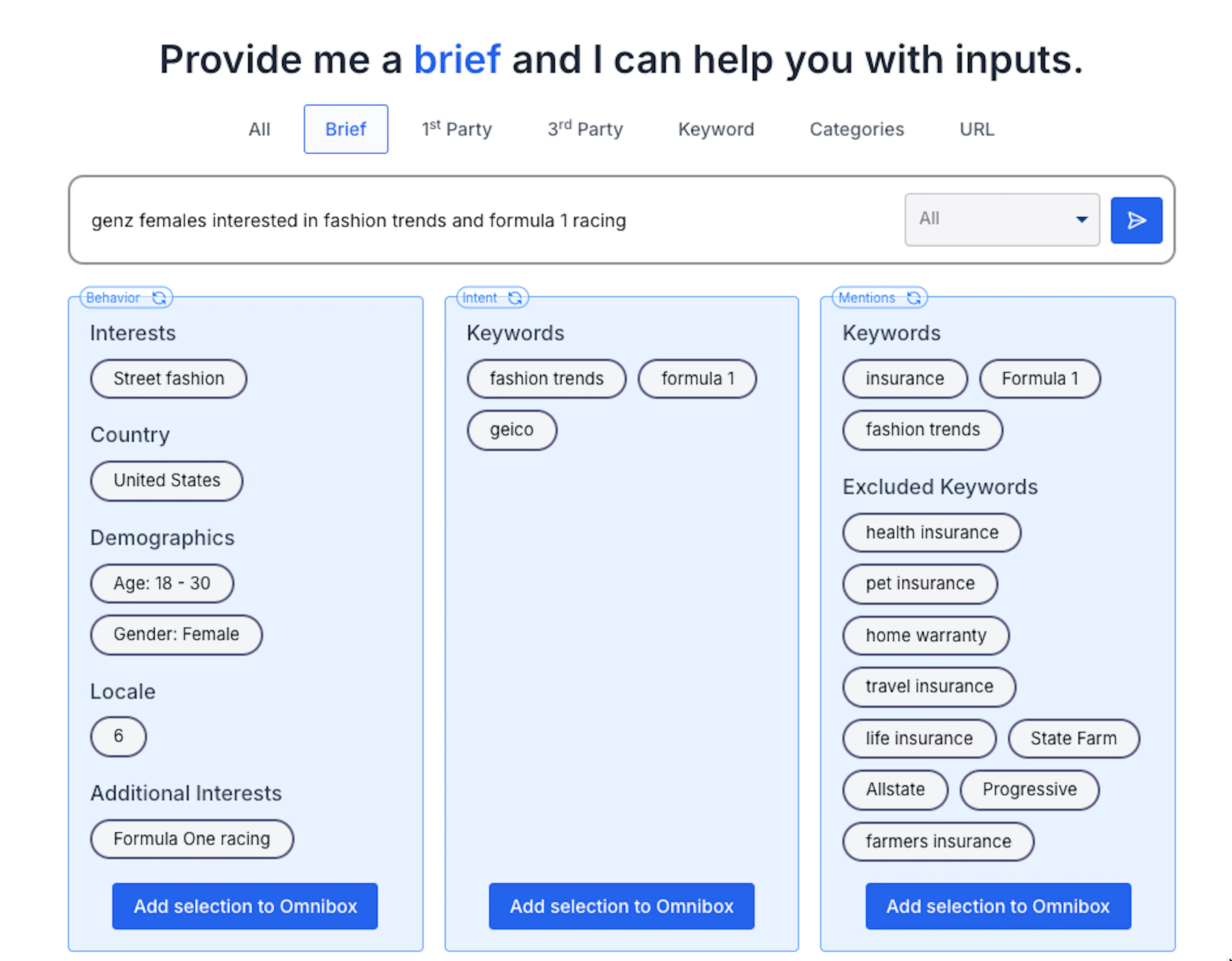
The extracted inputs appear in a structured format, organized according to the reports they can support.
Review the interpretation before continuing. The parsed result is a proposed interpretation of the brief. It should be reviewed rather than accepted automatically.
Step 6: Add the Relevant Selections
Select Add Selection to Omnibox for each input you want to use.
This allows you to control which parts of the parsed brief contribute to each report. Remove irrelevant selections and add any important inputs that were not identified from the original brief.
Configuring the Intelligence Reports
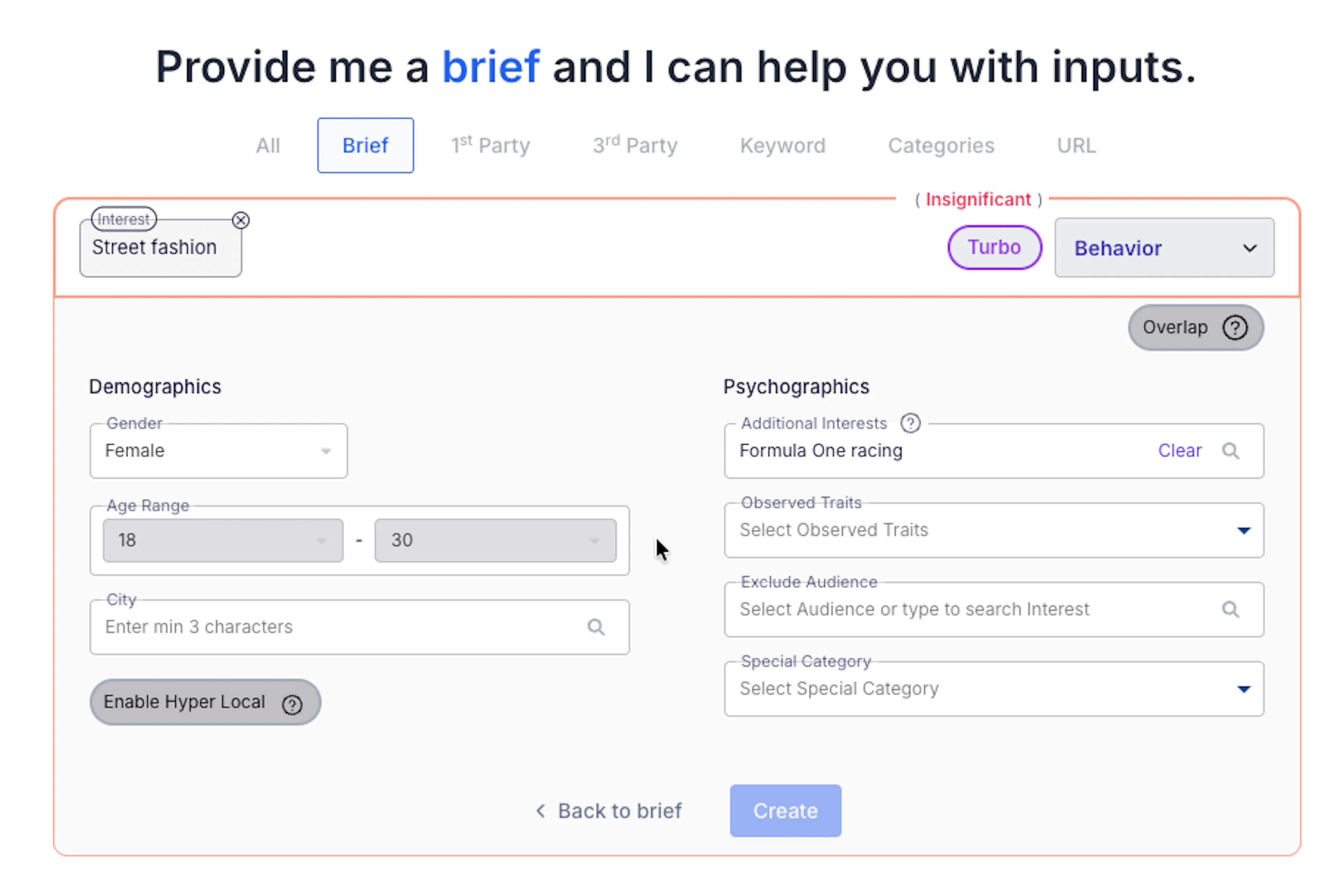
Step 7: Configure Behavior
Open the Behavior configuration and review the audience inputs added from the brief.
Refine the audience using the available options, which may include:
- Demographics
- Psychographics
- Excluded Audiences
- Audience segment categories
Use exclusions to remove audiences that are related to the input but do not belong to the intended research population.
Select Create when the Behavior configuration is complete.
Step 8: Configure Intent
Open the Intent configuration and review the search inputs added from the brief.
Refine the report using the available options, which may include:
- Platform Type
- Location
- Excluded Keywords
- Behavior Influences
Select the platforms and geographic market relevant to the research question. Use Excluded Keywords to remove unrelated meanings or search contexts.
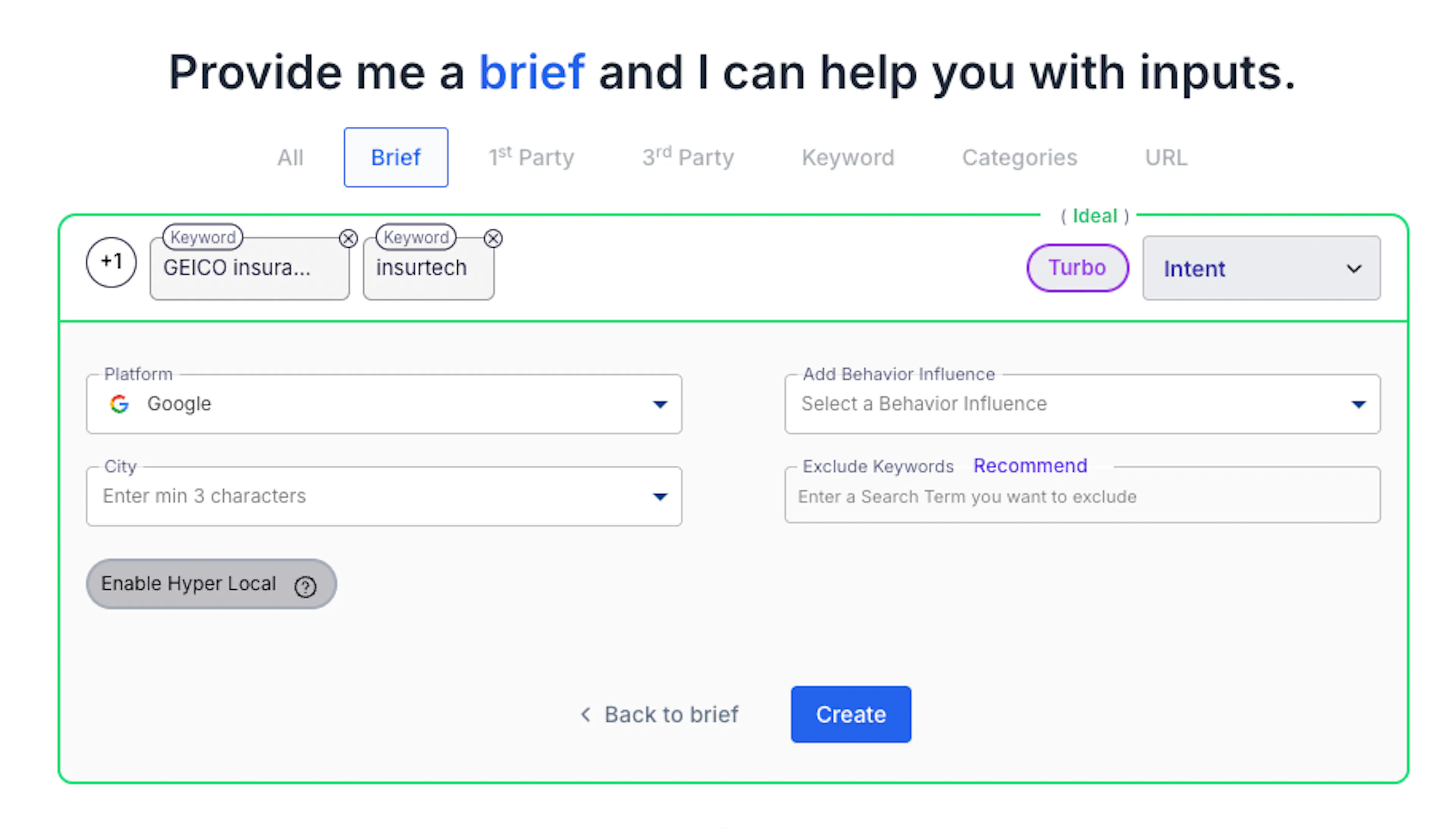
Select Create when the Intent configuration is complete.
Step 9: Configure Mentions
Open the Mentions configuration and review the brands, subjects, and keywords added from the brief.
Refine the report using the available options, which may include:
- Date Range
- Social Sources
- Excluded Keywords
Choose a date range that matches the period being investigated. Select the relevant sources and exclude terms that may introduce unrelated conversations.
Select Create when the Mentions configuration is complete.
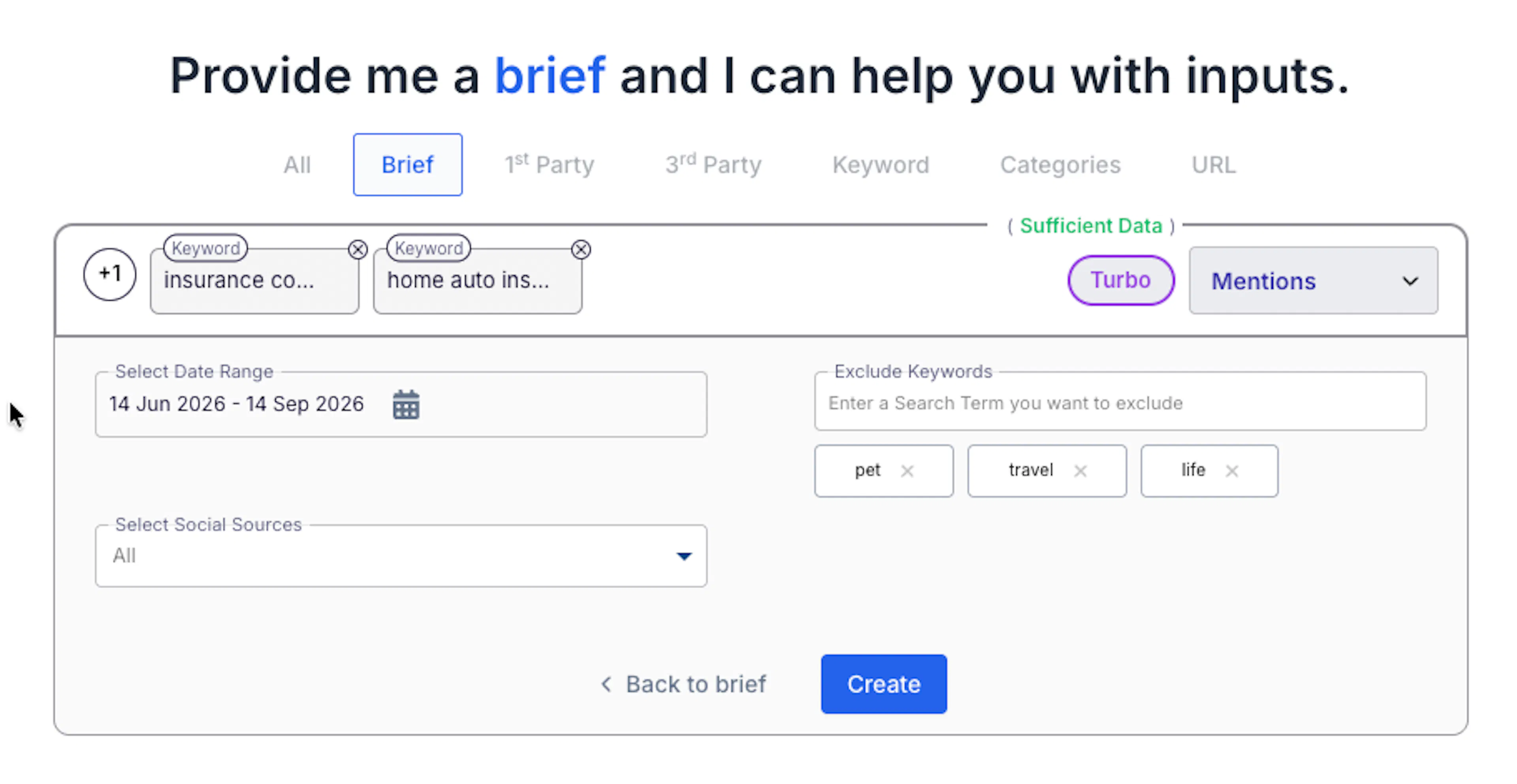
The selected reports do not need to be created simultaneously. Complete and create only the reports required for the research question.
Starting With Another Omnibox Input
A brief is not required. Use one of the following input methods when the research already has a more specific starting point.
Step 10: Start With a First-Party Audience
Open First-Party Audience when the organization already has a relevant audience available within consumr.ai.
Select the audience from the dropdown. The selected audience becomes the starting point for the relevant intelligence reports.
Review the report settings and add any necessary filters or exclusions before selecting Create.
Step 11: Start With a Third-Party Audience
Open Third-Party Audience to search the available catalog of curated audience datasets.
Third-party audiences are specific consumer segments collected, aggregated, and classified by data intelligence companies. They allow you to begin with an established audience when an appropriate first-party audience is not available.
Enter an interest, behavior, characteristic, or life stage to find relevant segments. Review the available audience definition and select the segment that most closely represents the intended population.
Step 12: Start With a Keyword
Open Keyword when the research begins with a specific word, phrase, product, brand, need, or subject. Enter the keyword and choose whether it should be added to:
- Intent
- Mentions
Use Intent to examine relevant search activity. Use Mentions to examine public conversation around the term. Add Excluded Keywords during report configuration when the term has unrelated meanings or contexts.
Step 13: Start With a Category
Open Category when the research begins with a broader product, service, or market category.
Enter the category and choose whether it should be used for Intent or Mentions.
A category provides a wider starting point than an individual keyword. Refine the inputs when the research should focus on a particular subcategory, product type, need, or use case.
Step 14: Start With a URL
Open URL and enter the supported webpage, product listing, Amazon listing, or app store page that should provide the initial context.
Submit the URL and review the Behavior and Intent inputs identified from the destination.
Remove any extracted input that does not belong to the research question and add any important audience, category, or search context that is missing.
Accessing the Completed Reports
Step 15: Open Studies
After creating the reports, open Studies from the main navigation.
Studies contains all new and previously generated reports including the intelligence reports generated through Omnibox.
How to Use Market Finder and Sniper
Market Finder and Sniper extend the Omnibox workflow from audience intelligence into geographic discovery.
Market Finder identifies broader markets where affinity for a selected audience or interest is stronger. Sniper narrows the analysis within a selected market.
Step 17: Choose the Audience or Interest
Begin with the first-party or third party audience or selected interest whose geographic affinity you want to investigate. Confirm that the selection represents the consumer group or interest relevant to the market question.
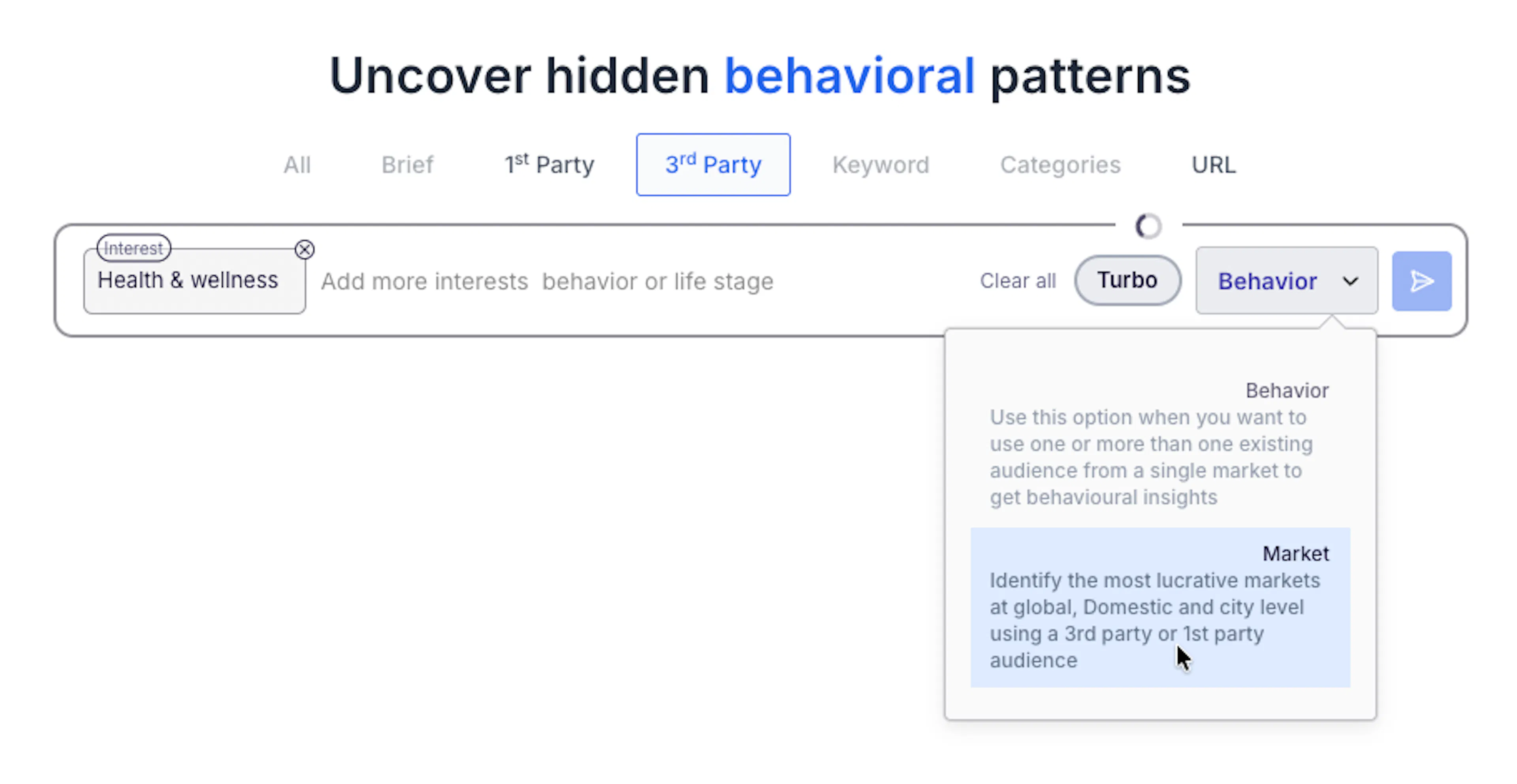
Select Market to identify relevant markets at global, domestic, and city levels using a first-party or third-party audience. Submit to run the analysis.
Step 19: Select a Market
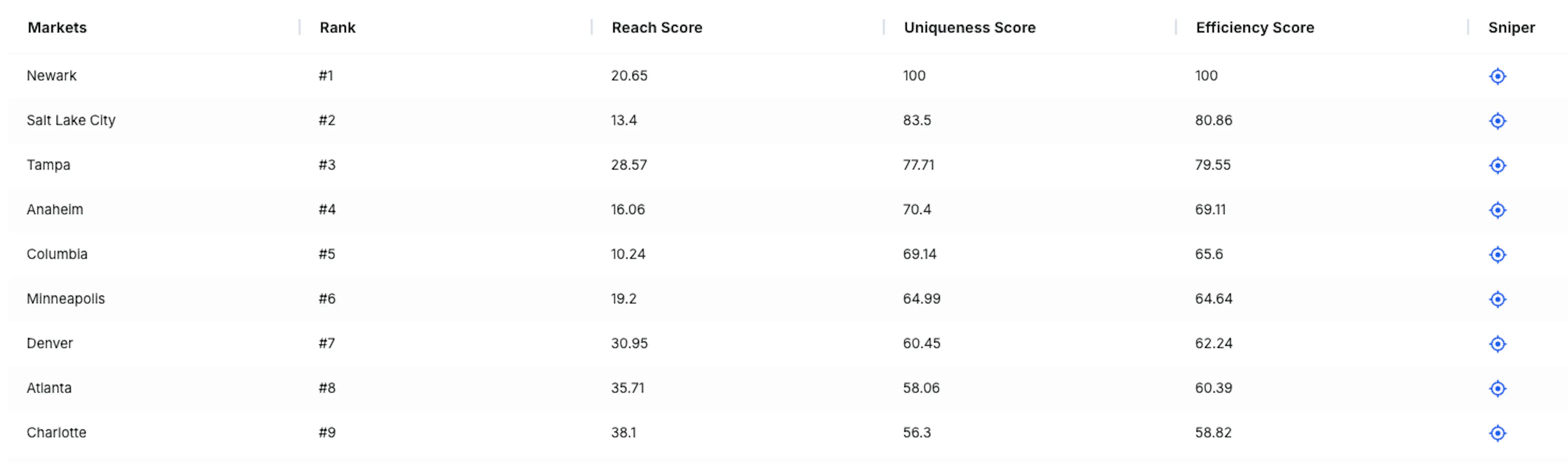
Review the available markets and choose the country or broader geographic area that should be investigated further. Consider the market’s relevance to the research objective in addition to its affinity ranking.
Step 20: Open Sniper
Select Sniper to narrow the analysis within the chosen market.
Depending on the selected location and available data, Sniper can identify more specific concentrations across ZIP codes or other local areas