

A1.1 Brand Track Survey
Measure how your brand performs against competitors across awareness, familiarity, consideration, preference, intent, endorsement, brand attributes, and NPS within a defined consumer segment.
A Brand Track Survey is a Standard Survey workflow in consumr.ai that helps you measure how consumers perceive your brand and how that perception compares with competitors. It is used when a team wants to understand brand health from the consumer’s point of view, not only through internal performance metrics such as sales, clicks, leads, or conversion rates.
Brand tracking is useful for teams that operate in competitive markets and need to know where their brand stands in the minds of a defined audience. It helps answer questions such as how aware consumers are of your brand, how familiar they feel with it, whether they would consider it, whether they prefer it over alternatives, whether they intend to purchase, and whether they would recommend it. The value of a Brand Track Survey is not only in measuring your own brand, but in seeing those results next to the brands competing for the same consumers.
Where Brand Track Fits in consumr.ai
Within consumr.ai, Brand Track sits under Quantitative Research, inside Survey Research, as one of the Standard Survey types. Standard Surveys use fixed, pre-built question templates. consumr.ai currently offers three Standard Survey types: Brand Track, Segmentation, and Media Consumption. Each one has a defined objective and a standardized question set. In Brand Track, users do not write or edit the questions. They select the Brand Track workflow, define the target Segment or AI Twin, add the relevant competitor brands where required, and run the survey.
This standardization also supports Brand Track Over Time. When a Brand Track is scheduled to recur, each wave uses the same research setup as the original report. Users do not rebuild the study between runs. The only variable that changes is the point in time at which the measurement is taken.
What a Brand Track Survey Measures
A Brand Track Survey measures six mindset metrics within the selected target segment: Awareness, Familiarity, Consideration, Preference, Intent, and Endorsement. These metrics help show how the audience moves from simply knowing the brand exists to being willing to choose or recommend it. The same template is applied across the focal brand and selected competitors, giving users a side-by-side view of where each brand stands within the same audience.
Each Brand Track Survey may include between 10 and 20 questions depending on the product and setup. The template is fixed by design so the results can remain consistent and comparable. This is especially important when a Brand Track Survey is repeated over time, because the value of tracking comes from comparing like with like across different waves.
Brand Attributes
The Brand Track Survey also measures brand attributes. In consumr.ai, this section asks respondents to allocate 100 points across attributes that best describe each brand. The attributes measured are Customer Support, Innovation, Premium Feel, Trust, and Value for Money. This method creates a relative view of brand positioning. It shows which attributes are strongest for a brand compared with others, rather than treating every attribute as an isolated score.
Net Promoter Score
Brand Track also includes Net Promoter Score, or NPS, for your brand and selected competitors within the same segment. NPS is based on the question of how likely a respondent is to recommend a brand to a friend or colleague, measured on a scale of 0 to 10. Respondents who score 9 or 10 are classified as Promoters, those who score 7 or 8 are Passives, and those who score 6 or below are Detractors. Measuring NPS for your brand and competitors within the same cohort gives a more directly comparable view of advocacy across the category.
Brand Track Over Time
Brand Track Over Time brings recurring Brand Track reports together so you can see how brand health and consumer perception change across different points in time.
A single Brand Track measures where the focal brand and its competitors stand when the survey is conducted. Once the report is scheduled to recur, each completed run adds another point of measurement. These reports can then be viewed together to determine whether the brand’s position is strengthening, weakening or remaining stable.
Building a Comparable View Over Time
When a Brand Track is scheduled to recur, every run automatically uses the same portfolio, focal brand, competitor set, Segment or AI Twin, demographic criteria and standardized questions as the original report. Users do not recreate or change the research setup between runs. The only difference is when each measurement is taken.
This consistency is what makes the reports comparable. A change between runs reflects how the same defined audience responded at different points in time, rather than a difference caused by using another audience, competitor set or survey configuration.
Brand Track Over Time can therefore show whether awareness is growing, consideration is declining, a competitor is gaining preference or the qualities associated with a brand are beginning to change.
What a Brand Track Survey Will Not Tell You
It is important to understand what a Brand Track Survey will not tell you. Brand Track is Quantitative Research. It measures what is happening across a defined consumer population. It can show that awareness has increased, preference has declined, or a competitor has stronger association with a certain attribute. It does not directly explain why those changes happened. If a Brand Track Survey shows that consideration has fallen or NPS has shifted, the next step should be to use Qualitative Research workflows such as Focus Groups, Investigative Interviews, or AI Twin Conversations to understand the reasons behind the movement.
Why Brand Tracking Matters
Brand tracking matters because marketing teams often look only at campaign performance metrics. Click-through rate, conversion rate, and cost per acquisition show how an activity performed. They do not always show the market conditions in which that performance happened. A Brand Track Survey helps teams understand the state of brand perception behind those numbers. It can show whether consumers are aware of the brand, whether competitors are stronger on key attributes, whether the brand is becoming more or less preferred, and whether perception is moving over time.
A Brand Track Survey can be useful after a campaign, product launch, pricing change, repositioning effort, or major PR moment. However, a single Brand Track Survey should not be used to claim that one activity caused a change in perception. To understand movement properly, the survey should be run before and after the activity, with the same segment setup and comparable competitor set. This allows teams to see whether perception moved in the intended direction, while still using Qualitative Research to investigate what may have driven that movement.
How Brand Track Respondents Work
The respondents in a consumr.ai Brand Track Survey are not recruited from a traditional survey panel, incentivized with cash, or sourced through a third-party fieldwork supplier. They are quantitative mini-twins powered by memory shards derived from the AI Twin representing the selected target segment. Each mini-twin carries enough behavioral context to answer the Brand Track Survey questions, using aggregated signals from real digital behavior across platforms.
AI Twins do not respond to surveys directly. Their memories are large, and creating multiple full AI Twins for survey purposes would be computationally unnecessary. Instead, consumr.ai creates a respondent cohort from shards of the AI Twin’s memory. These respondents are then weighted to reflect the distribution categories within the defined segment population and the corresponding demographic data, such as ACS in the United States. This helps the results represent the intended consumer population rather than a convenience sample.
Before You Run a Brand Track Survey
Before running a Brand Track Survey, users must have a Segment or AI Twin ready. The Segment or AI Twin defines whose perception is being measured. Without a defined population, the Brand Track output has no clear audience to describe. Once the segment is ready, the survey measures how that group perceives your brand, how it perceives your competitors, and how those perceptions compare.
The quality of the Brand Track output depends heavily on the quality of the segment setup. A segment that is too broad may return averages that hide important differences within the audience. A segment that is too narrow may limit the strength of the respondent cohort and make the results less stable over time. Users should define the audience carefully before the first run, especially if the Brand Track Survey will be repeated as a tracker.
How consumr.ai’s Brand Track Survey Differs
consumr.ai’s Brand Track Survey differs from traditional brand tracking because it does not depend on recruited survey panels. Traditional panels often involve respondents who have signed up to take surveys for cash, rewards, or points. This can introduce issues such as panel fatigue, professional respondent behavior, and incentive-driven responses. consumr.ai reduces many of these panel-related issues by deriving respondents from real behavioral data and weighting them against population benchmarks.
Another difference is segment specificity. Many traditional brand trackers start with a broad population and then apply demographic filters after the data is collected. consumr.ai builds the segment upfront. The distribution filter determines which mini-twins are included in the respondent cohort before the survey runs. This means the Brand Track results are derived from the target audience being studied, rather than being filtered down from a broader sample after the fact.
Brand Track also gives users a competitive view of NPS and brand perception within the same segment and wave. Instead of only measuring your own brand in isolation, the survey shows how your brand performs next to selected competitors on the same mindset metrics, brand attributes, and recommendation scale. This makes the output more useful for category-level decision-making.
Like any research tool, Brand Track has limits. It is built on behavioral data from digital platforms, which means it works best in markets with meaningful digital populations. In markets where digital infrastructure is restricted, limited, or not representative of the broader population, the results should be interpreted with that context in mind.
Cohort size also matters. Narrow segment definitions can reduce stability, especially if the survey is used for tracking over time. consumr.ai surfaces statistical indicators that should be reviewed before making decisions from the results. Users should avoid drawing strong conclusions from a segment that is too narrow or from cells that do not have enough strength.
Brand Track is a measurement instrument, not a full diagnostic tool. It tells you where movement is happening, which brands are stronger or weaker on specific metrics, and whether perception is changing over time. It does not explain the full reason behind those shifts. For that, users should move into Qualitative Research. Quant tells you where to look. Qual helps explain what may be happening there.
The segment is the foundation of the study. Brand tracking only produces consistent and comparable results if the segment definition stays consistent across waves. Changing the audience definition, competitor set, or survey setup can make trend comparisons difficult. The first Brand Track setup should therefore be created carefully, because it becomes the base for every future comparison.
How To Create a Brand Track Survey
Step 0: Getting to Brand Track
Log in to consumr.ai and navigate to the main dashboard. From there, click on Calendar, then New Event, then select New Research Study. You'll be prompted to choose a research type - select Quant, then Survey Research, then Standard Survey. From the survey options that appear, click on Brand Track to begin setting up your study.
Step 1: Select Your Survey Type and Competitors
Once you've completed the setup flow, you'll land on the Survey Type screen. Select Brand Track - described as "Monitor brand health and competitor performance" - and you'll see a competitor selection panel appear below.
For the purposes of this walkthrough, we'll be using A Shoe Brand as the example brand being tracked.
This is where you choose which brands you want to benchmark against. Competitors are grouped by type: Direct competitors are brands operating in the same category targeting the same customers. If you want the platform to suggest competitors for you, click the Recommend button and consumr.ai will use AI to generate a fuller list based on your brand's category.

The expanded list breaks competitors down into four groups: Direct, Indirect, Aspirational, and Emerging. Direct competitors are your closest rivals. Indirect competitors operate in adjacent spaces but still compete for the same consumer. Aspirational brands are those your target audience looks up to or aspires toward. Emerging brands are newer players gaining traction in the category. You can select as many as 10 brands relevant to your study, then click Select Segment to proceed.

Step 2: Select Your Segment
After selecting your competitors, you'll be taken to the Select Segment screen. This is where you define the consumer population your survey will run against. You must have a Segment or AI Twin already created before this step - if you don't have one ready, you'll need to build one first. To read more on segment creation click here
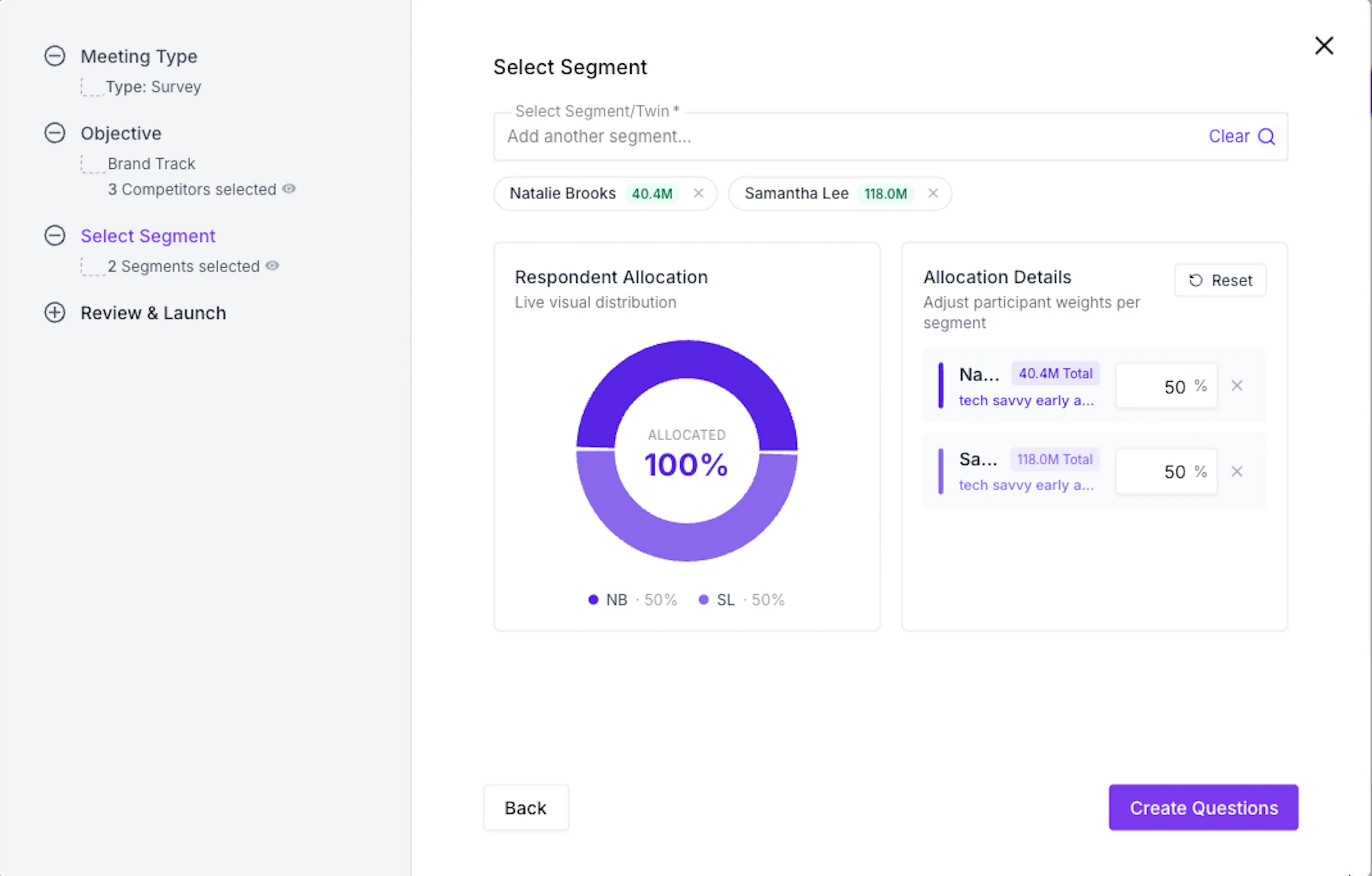
Once you're satisfied with the respondent allocation of twins, click Create Questions to move to the next step.
Step 3: Review the Survey Questions and Launch
After clicking Create Questions, you'll land on the Survey Questions screen. Brand Track surveys come with a fixed set of 31 pre-built questions - you'll see this noted at the top of the screen. Unlike other survey types on consumr.ai, these questions cannot be edited, deleted, or replaced. The template is standardized by design, which is what allows you to run the survey repeatedly over time and compare results across waves without inconsistency.
The questions are structured to cover the full picture of brand health. They open with unaided awareness (Q1: Which of the following brands have you heard of?), move into purchase consideration (Q2: Which ONE of the following brands would you most seriously consider for your next purchase?), past purchase and usage behaviour (Q3: Which of these brands have you EVER purchased or used?), and continue through brand attribute associations, emotional perception, and likelihood to recommend - which generates the NPS score for your brand and each competitor.
All brands you selected in Step 1 appear as answer options across every relevant question, making the competitive benchmarking direct and consistent.

Once you've reviewed the questions, you have two options at the bottom of the screen.
Select Conduct Meeting Once to run a one-time Brand Track. This produces a snapshot of the brand’s current position.
Select Start Meeting and Schedule to create a recurring Brand Track. The scheduling panel allows the study to be repeated between the selected start and end dates, with an optional notification when each run is completed. Once confirmed, every wave uses the original Portfolio, focal brand, competitor set, Segment or AI Twin, demographic criteria, and standardized questions.
Weekly and fortnightly schedules are not recommended. A Brand Track should run for at least three months and produce at least four completed data points before longer-term patterns are interpreted.
If you choose to schedule, you'll set a start date, select the day of the week it runs, set an end date, and enable notifications for when each wave completes.

This scheduling feature is what turns a one-time snapshot into a true tracking study. Running the same 31-question survey against the same segment on a consistent cadence is how you build trend data that shows whether brand perception is moving in the right direction - and how fast. Once confirmed, click Conduct now and Schedule to launch.
Step 4: Survey Summary
Once the survey has run, you'll land on the results dashboard. The first thing you see is the Survey Summary - a snapshot of the statistical properties of the dataset before you look at the actual findings.

For a more detail review on how to read the Survey Summary click here.
Step 5: Analysis - Brand Comparison, Brand Health Funnel and Brand Perception Matrix
Scrolling down the Analysis tab you'll find the core brand tracking outputs. On the left is the Brand Comparison panel, which gives you an overall ranking of how consumers feel about each brand. Each brand is labelled either Leader or Follower. The Leader is the brand with the strongest overall standing in the segment. In this example, New Balance holds the Leader position at 38%, with Hoka at 16%, Nike and Brooks both at 14%, Asics at 11%, and Adidas at 7%.
To the right is the Brand Health Funnel, which shows how each brand performs across six stages of the consumer journey: Awareness (have they heard of it?), Familiarity (do they know it well enough to form an opinion?), Consideration (would they seriously consider buying it?), Preference (do they prefer it over alternatives?), Intent (do they plan to buy it soon?), and Endorsement (would they recommend it to others?). Every brand is shown side by side at each stage so you can see exactly where you lead and where competitors have the upper hand.
To find out which specific survey question each stage is derived from, hover over the information icon next to each stage label.

Below the funnel sits the Brand Perception Matrix. This is based on a point-allocation question where respondents distribute 100 points across the attributes that best describe each brand.
The five attributes measured are Customer Support, Innovation, Premium Feel, Trust, and Value for Money. Because the total always sums to 100, a high score on one attribute comes at the expense of others - making this a genuinely comparative read on how each brand is positioned in the consumer mind.

Step 6: Distribution Tab
The Analysis tab presents your data in an aggregated, interpreted form - visuals and rankings derived from all 31 responses. The Distribution tab sits alongside it and shows you something different: the raw question-by-question breakdown of what respondents actually answered, expressed as real population numbers rather than percentages.
Each question is shown as a bar chart where the y-axis represents the real-world population. You can scroll through all 31 questions from this tab and download individual question data or the full dataset using the Full Dataset button at the top right.

Note: For a detailed explanation of every feature in the results dashboard - including filters, Meeting Chat, Meeting Properties, Transcript, scheduling, and the AI strategic summary - see the companion document here.