

A1. Adding a Pre-defined Segment
Bring your existing audience understanding into consumr.ai and transform it into AI Twins and Respondents that can participate in research.
Every company has customers it wants to understand, but not every company describes those customers in the same way. Some organizations have detailed audience briefs developed through segmentation studies, customer research, strategy work, or years of category experience. They already know who their audiences are, what distinguishes them, and why they matter. Others may have only a segment name and a basic definition. They know the audience they want to reach, but their understanding has not yet been developed into a comprehensive brief.
consumr.ai is designed to support both starting points.
If your organization already has a detailed audience brief, you can upload it directly using Segment From PDF. If you have a segment name and definition, you can enter them using Enter Segment Definition. When more detail is needed, consumr.ai can recommend and develop the definition further, helping you create a research-ready brief without requiring you to begin with a completed segmentation document. The purpose is not to replace what your organization knows about its audience but to make that knowledge usable throughout the consumr.ai platform.
Why Segment Definition Comes First
Every study on consumr.ai requires a clearly defined audience.
In Qualitative Research, that audience participates through AI Twins. In Quantitative Research, it participates through survey Respondents. Without an AI Twin or a Respondent cohort, there is no audience to answer questions, evaluate ideas, discuss experiences, or participate in a study.
Segment creation is mandatory. Without an AI Twin or a Respondent cohort, there is no audience to participate in the research, and therefore no study.
The segment determines whose perspective the study represents. The same question asked of performance-focused runners, casual lifestyle buyers, loyal customers, or category newcomers can produce entirely different findings. Those differences are the reason the audience must be established before the research begins. A pre-defined segment becomes the foundation for every subsequent consumr.ai study that requires an audience.
What Is a Pre-defined Segment?
A Pre-defined Segment is an audience that your organization has already identified, either through a detailed brief or through an existing segment name and definition.
For example, an athletic-footwear company may distinguish between:
- Performance-focused runners
- Lifestyle buyers
- Value-conscious families
- Sneaker collectors
- Lapsed customers
The segment name makes the audience recognizable. The segment brief gives that name a backstory. A useful brief may describe the cohort’s circumstances, behaviors, needs, motivations, purchase patterns, relationship with the category, and relationship with the brand. It explains not only who the audience is, but what holds the cohort together and what distinguishes it from other groups.
This does not mean that every person within the segment is identical. The brief establishes a shared center for the cohort while preserving room for natural variation among the AI Twins or Respondents created from it.
Before Adding a Pre-defined Segment
Before beginning, consider what audience information your organization already has.
Use Segment From PDF if:
- You have a detailed audience or segmentation document
- The document contains established segment names and descriptions
- You want to preserve an audience framework already used by your organization
- You need to add several existing segments efficiently
Use Enter Segment Definition if:
- You have a segment name and a written description
- The audience is understood but has not been formalized in a PDF
- You want to create one or a small number of segments directly
- You want consumr.ai to help develop a more detailed definition
Whichever method you choose, confirm that the audience is relevant to the research objective and meaningfully different from the other segments in the study.
How a Segment Definition Becomes an AI Twin
Entering a segment name and definition does not complete the AI Twin. It establishes the identity from which the rest of the Twin is built. Once the segment definition is confirmed, consumr.ai develops it through three additional layers:
- Segment Brief and Mindset Label
- Mindset Metrics
- Behavior, Intent, and Mentions Intelligence
Each layer contributes something different. The brief explains who the audience is. The Mindset Label summarizes its current orientation. Mindset Metrics express that orientation across six measurable dimensions. The Intelligence reports provide the data signals that ground the Twin’s knowledge and responses. Together, they turn a short audience definition into a research-ready AI Twin. This is how an audience definition becomes a research participant.
Walkthrough of How to Add a Pre-defined Segment
Step 0: Open Research Setup
Log in to consumr.ai and open Research Setup.

The segment setup page shows the three available methods:
Step 1: Choose How to Add the Segment
On the Segment Setup screen, choose one of the following:
- Segment From PDF
- Enter Segment Definition
- Create My Segment From 1st Party Audience
The first two options are used for pre-defined segments. The third option creates a segment from an audience in a connected advertising platform and is covered separately in Creating a Segment Using a 1st Party Audience.
Select the method that matches the format in which your segment definitions currently exist.

Step 2A: Upload Segment Definitions From a PDF
If you selected Segment From PDF, an upload panel will appear. Upload the PDF containing your segment definitions. The platform accepts PDFs up to 10 MB. Where possible, upload only the pages containing the segment names and definitions. This helps prevent supporting material from being interpreted as part of the segment.
An optional Additional Instructions field is available. Use it when you need to clarify:
- Which segments should be extracted
- Which parts of the PDF should be ignored
- Whether the original names should be preserved
- Whether the document contains definitions for multiple markets
- Any terminology specific to your organization
Once the PDF has uploaded, click Continue.

Step 2B: Enter Segment Definitions Manually
If you selected Enter Segment Definition, click Continue to open the Define Your Segments screen.
Enter the Segment Name and Segment Definition.
The definition should explain who the segment represents and what distinguishes it from other audiences. Include the behaviors, attitudes, needs, or category relationships that are important to the intended research.
If you want the platform to propose an initial definition based on the segment name, click Recommend. Review and edit the recommendation before continuing. A suggested definition is a starting point, not a substitute for the researcher’s understanding of the audience.
To add another segment, click Add New Segment.

Step 3: Review the Segment Definitions
When a PDF is used, consumr.ai extracts the segment names and definitions and displays them as individual cards.
Review each card carefully. Confirm that:
- The segment name is correct
- The definition preserves the intended meaning
- Important distinctions have not been removed
- The segment does not unintentionally overlap with another segment
- No supporting text has been mistaken for part of the definition
You can edit the extracted/generated content directly. A green checkmark indicates that the required fields for a segment are complete. If an intended segment was not extracted, click Add New Segment and enter it manually. When all segments have been reviewed, click Continue.
Step 4: Choose What to Create
After confirming the segments, consumr.ai asks what you want to create first.
- Segment Twins to create AI Twins for Qualitative Research
- Respondents to create cohorts for Quantitative Research
You do not need to create both at the same time. You can complete one path and return to the segment setup to create the other later.

The next steps determine how that audience is developed for the type of research you want to conduct.
Step 5: Review the Mindset Label and Metrics
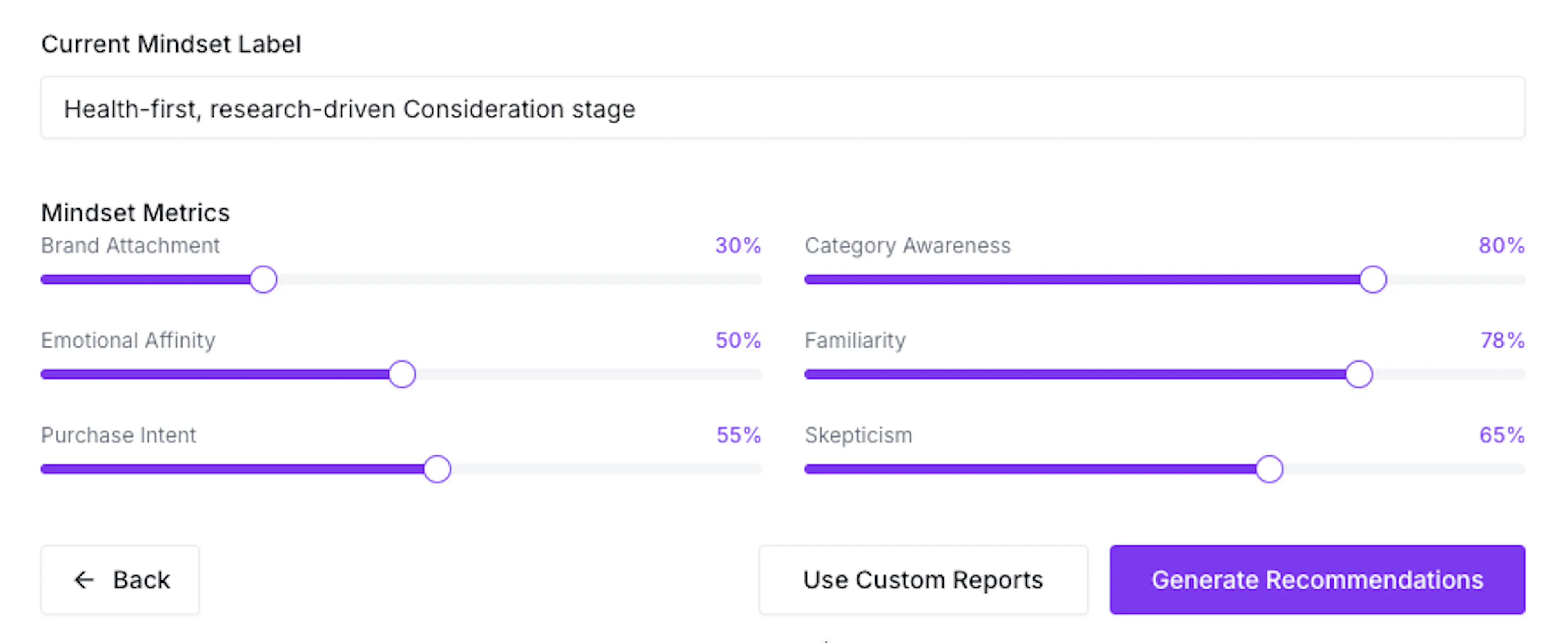
Review the Current Mindset Label and the six Mindset Metrics:
- Brand Attachment
- Category Awareness
- Emotional Affinity
- Familiarity
- Purchase Intent
- Skepticism
Use the sliders to adjust any value that does not reflect the intended cohort. Do not review each value in isolation. Consider whether the complete combination describes a coherent audience. For example, a research-driven audience may have high Category Awareness, moderate Purchase Intent, and relatively high Skepticism. The combination explains not only whether the audience is considering a purchase, but how it approaches that decision.
Step 6: Choose the Intelligence Input Method
After reviewing the mindset, select one of the following:
- Generate Recommendations
- Use Custom Reports
Choose Generate Recommendations if you want the platform to identify appropriate Behavior, Intent, and Mentions inputs from the Segment Brief and mindset.
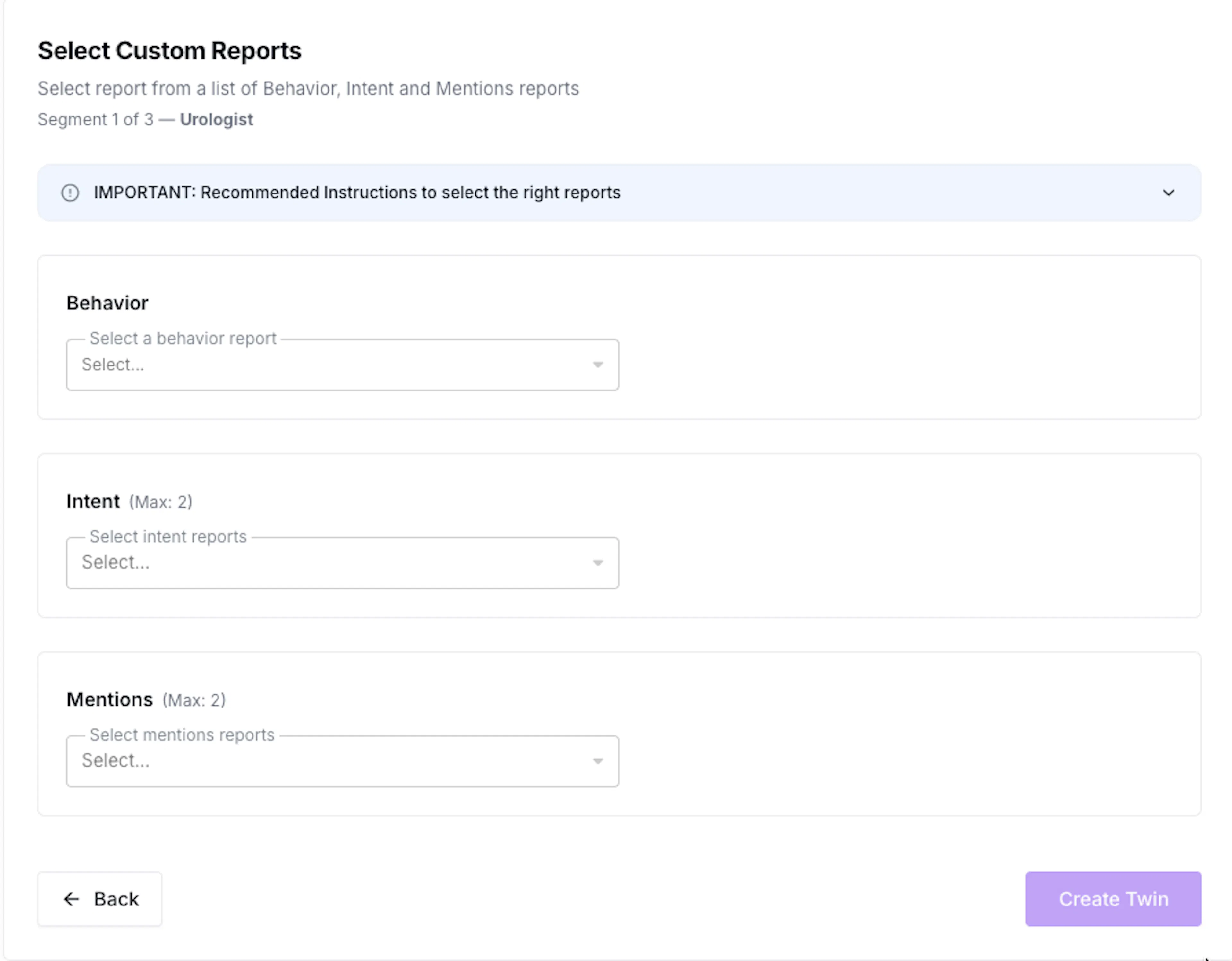
Choose Use Custom Reports if the appropriate Intelligence reports already exist in your account and you want to select them directly.
Step 9A: Review Generated Recommendations
If you selected Generate Recommendations, the Input Recommendations screen opens.
Review the recommended:
- Behavior inputs
- Intent keywords
- Mentions keywords, date range, and exclusions
The screen displays recommendations for one segment at a time. Review every section and use the edit controls where changes are required. If a recommendation is not suitable, revise or regenerate it before creating the Twin.

Step 9B: Select Custom Reports
If you selected Use Custom Reports, select the reports that should support the current segment. Choose the relevant Behavior report, Intent report and Mentions report. The chosen reports should reflect the same audience described in the Segment Brief and Mindset Metrics.
Step 10: Create the Twin
Once the Intelligence inputs have been reviewed, click Create Twin or Create Twin & Continue.
If several segments are being created, the system moves to the next segment so that its brief, mindset, and Intelligence inputs can be reviewed independently.
After all segments have been confirmed, the platform begins creating the Twins. No further input is required during processing. The completed Twin can then participate in the Qualitative Research workflows available on consumr.ai.