

A2. Creating Segment Using 1st party Audience
Use privacy-safe behavioral signals from an audience in a connected advertising platform to create AI Twins and survey Respondents.
Companies learn about their customers through direct interactions.
A person may visit the company’s website, view a product, add something to a cart, complete a purchase, subscribe to a service, use an app, or engage with the brand’s content. These interactions are examples of first-party data because they occur through channels the company owns or operates. This data can provide a stronger starting point for research than a general audience description. It reflects what consumers have actually done in relation to the business. Using first-party data responsibly, however, requires a clear separation between individual customer information and population-level audience insight.
consumr.ai maintains that separation by working through audiences already created inside connected advertising platforms. The company does not upload its customer list or personally identifiable information to consumr.ai. consumr.ai does not receive the identities of the people inside the audience or their individual activity histories.
Instead, the advertising platform keeps the audience and its members within its own environment. consumr.ai uses the anonymized and aggregated behavioral signals made available through the authorized account connection to understand the audience as a cohort.
What Is First-Party Data?
First-party data is information a company collects through its direct relationship with customers and prospects. It can come from:
- Visiting a website or app
- Viewing a product
- Adding a product to a cart
- Completing a purchase
- Submitting a lead form
- Registering for an account
- Subscribing to a service
- Engaging with the company’s owned content
Website interactions are often captured through a pixel or tag. This is code installed on a company’s website to record selected events and send them to an advertising platform. Meta calls this technology the Meta Pixel. Snapchat uses the Snap Pixel, and Pinterest uses the Pinterest Tag. Depending on how it is configured, a pixel may record events such as Page View, View Content, Add to Cart, Checkout, Lead, Registration, or Purchase.
The company decides which events to measure and is responsible for configuring the technology according to its consent and privacy requirements. The advertising platform uses these events to create a Custom Audience. For example, a company may create an audience of people who viewed a product category within the last 30 days or purchased within the last 180 days.
A Custom Audience may also be created from another approved first-party source, such as a customer list. If a customer list is used, it is provided directly to the advertising platform according to that platform’s process. It is not uploaded to consumr.ai.
The Data and Privacy Boundary
The data passes through distinct systems, each with a different role.
| System | Role | Information it retains |
|---|---|---|
| Company systems | Collect direct customer interactions through the website, app, CRM, transactions, or other owned channels | The company’s first-party records |
| Pixel or tag | Sends configured website events to the advertising platform | No separate audience is created inside consumr.ai |
| Advertising platform | Matches events or approved customer information, creates the Custom Audience, and models lookalike audiences | Audience membership, identity matching, and platform-level activity |
| consumr.ai | Uses the permitted aggregated signals associated with the selected audience to develop a research segment | Non-identifying audience patterns and the description entered by the researcher |
The advertising account connection allows the user to select an eligible audience and use its privacy-safe, population-level signals. It does not transfer the underlying audience into consumr.ai.
How Lookalike Audiences Contribute
A lookalike audience is a broader population identified by an advertising platform as sharing relevant characteristics with a source audience.
For example, a company may begin with an audience of recent purchasers. The advertising platform can analyze patterns within that audience and identify other platform users with similar behavioral characteristics.
This modeling occurs within the advertising platform. consumr.ai does not receive the identities of the people in the source or lookalike audience.
The aggregated characteristics associated with these audiences can help inform the resulting segment’s Behavior Intelligence, including interests, affinities, demographic context, and other population-level patterns.
The company retains its customer data. The advertising platform retains the audience. consumr.ai works from non-identifying patterns about the cohort.
Why an Audience Description Is Required
A Custom Audience identifies a behavioral population, but its name may not explain what the population means for research. An audience called “Purchasers 180 Days” indicates when people purchased. It does not explain what they purchased, why they matter to the study, how they relate to the category, or what the company wants to learn from them.
The Audience Description provides this context.
For example:
Customers who purchased performance-running footwear within the last six months. They engage with running and fitness content and tend to evaluate cushioning, stability, fit, and durability. We want to understand what drives repeat consideration and what could cause them to switch brands.
The description should explain the audience as a cohort. It must not contain customer names, contact information, individual histories, or other personally identifiable information.
How to Create a Segment From a 1st Party Audience
Step 0: Prepare the Custom Audience
Create the Custom Audience inside the relevant advertising platform. Give the audience a clear name so it can be identified later in consumr.ai.
Step 1: Connect the Advertising Account
Connect the advertising account containing the Custom Audience to consumr.ai.
If your company manages several advertising accounts, confirm that you are connecting the account in which the intended audience was created.
Step 2: Select the Setup Mode
Open Research Setup and go to Segment Setup.
Select Create My Segment From 1st Party Audience, then click Continue.

Step 3: Select the Audience
The 1st Party Behavior Signals screen opens.
Use the Audience dropdown to select the Custom Audience from the connected advertising account.
If the audience does not appear, verify that:
- The correct advertising account is connected
- The audience exists in that account
- Your account has permission to access it
- The connection is active
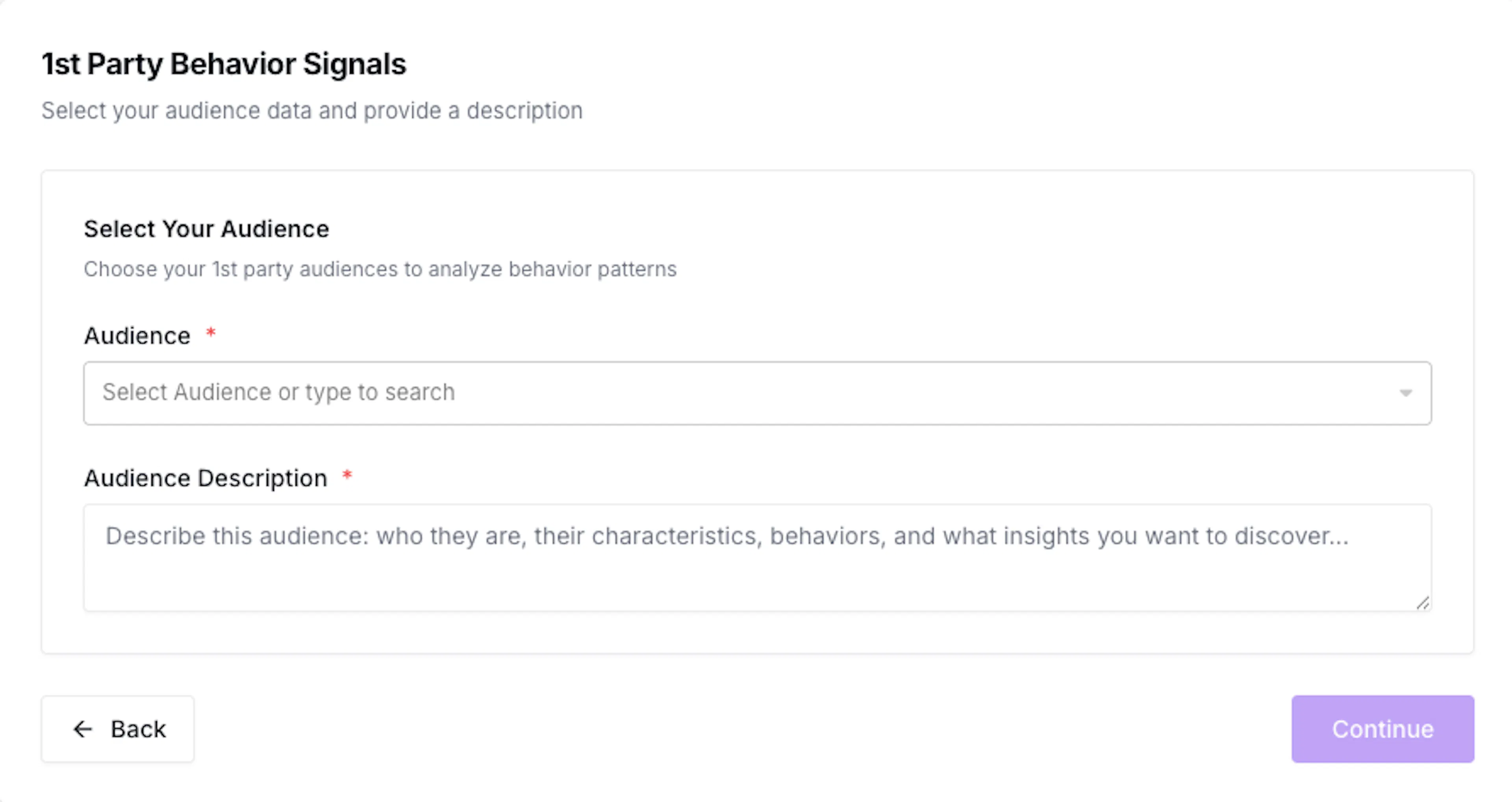
Step 4: Add the Audience Description
Enter a cohort-level description covering:
- Who the audience represents
- Which action or relationship defines it
- Its relationship with the brand or category
- The behaviors that make it relevant
- What the company wants to understand
Do not include personally identifiable information.
Once the Audience and Audience Description are complete, click Continue.
Step 5: Choose What to Create
- Segment Twins for Qualitative Research
- Respondents for Quantitative Research
If you select Respondents, continue to the survey setup.
If you select Segment Twins, continue through the Segment Brief, mindset, and Intelligence setup.

Step 6: Review the Segment Brief and Mindset
consumr.ai generates a detailed Segment Brief and Current Mindset Label for the audience.
Review the brief to confirm that it reflects the intended cohort. Then review the six Mindset Metrics and adjust the sliders where necessary.
The values should work together as a coherent description of how the audience approaches the brand and category.
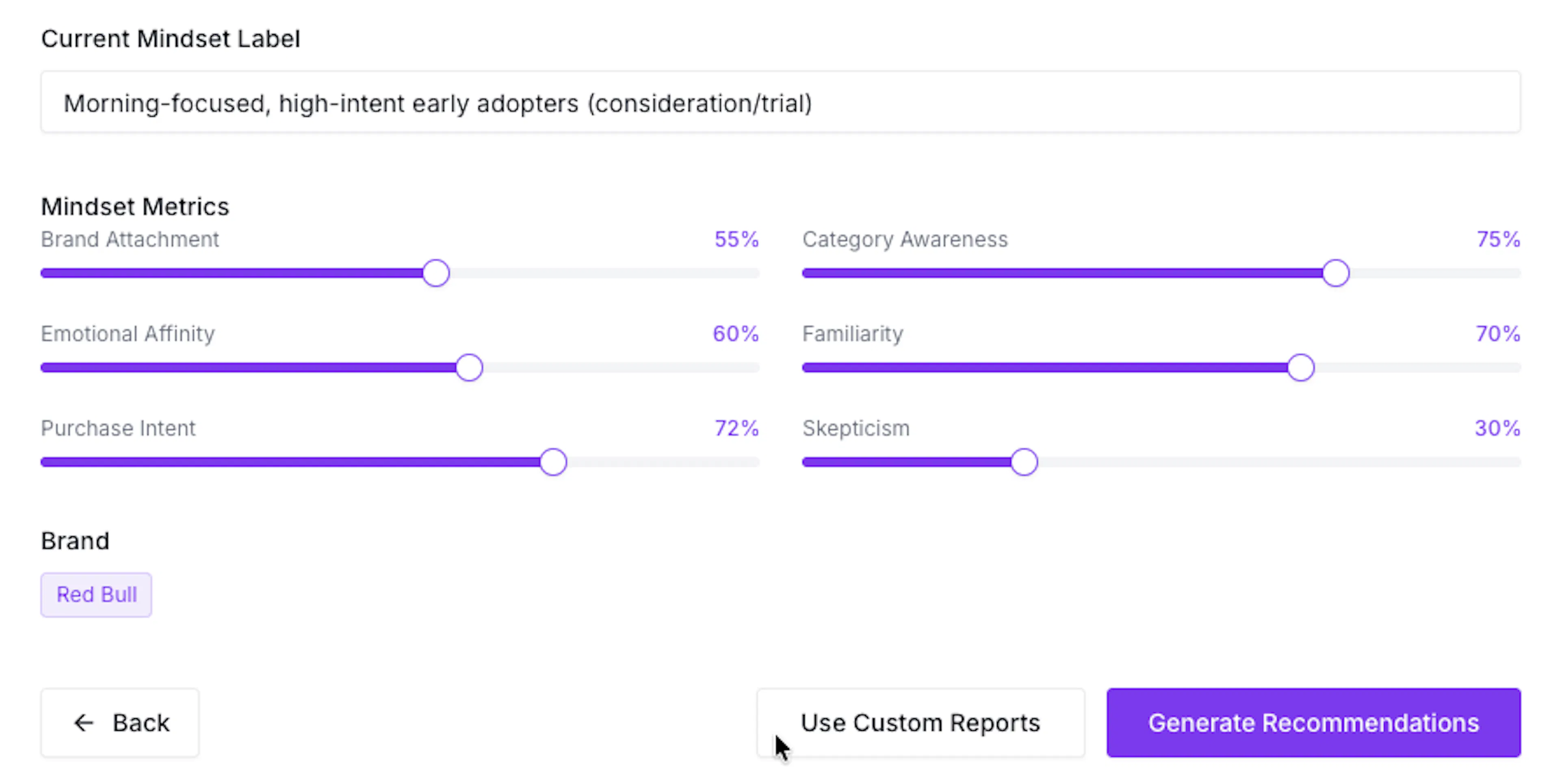
Step 7: Choose the Intelligence Inputs
Select one of two options:
- Generate Recommendations prompts the system to recommend Behavior, Intent, and Mentions inputs for the segment.
- Use Custom Reports allows you to select Intelligence reports that already exist in your account.
Choose the option that best fits the reports available and the level of control required.
Step 8: Review the Intelligence Inputs
If you generated recommendations, review:
- Behavior interests, additional interests, and demographic settings
- Intent keywords
- Mentions keywords, date range, and exclusions
Use the edit controls to correct any input that does not reflect the segment. If you selected Custom Reports, choose the appropriate Behavior, Intent, and Mentions reports for the audience.
Step 9: Create the Twin
After confirming the Segment Brief, Mindset Metrics, and Intelligence inputs, click Create Twin or Create Twin & Continue.
Repeat the review process for each segment being created.
The completed Twin can then participate in AI Twin Conversations, Focus Groups, Investigative Interviews, and other Qualitative Research studies. The same audience foundation can also be used to create Respondents for Quantitative Research.